Backup Egress Recordings
Last updated: July 7, 2026
Overview
If there is an error writing to a cloud storage provider, you will lose the recording. To assist with this, LiveKit provides an egress backup recording option to ensure that you can recover when this happens.
When this feature is enabled and a cloud storage upload fails, LiveKit will automatically save the recording to our backup storage bucket for 7 days. The location of the file is included in the EgressEnded webhook event.
Costs
There are no additional charges at this time (as of Jan-2026). This may change in the future.
Retrieving backup for failed egress upload
When an egress upload to a cloud storage provider fails and temporary egress backup is enabled for your LiveKit Cloud project, the recording will be stored to a backup storage bucket for retrieval.
In order to capture these occurrences, inspect the payload of the egress_ended webhook event with a status of EGRESS_COMPLETE and backupStorageUsed set to true.
Example payload of egress_ended event with backup storage used
{
   "event":"egress_ended",
   "egressInfo":{
      "egressId":"EG_zRUAsFnTKY4M",
      "roomId":"RM_MTfPWoTnLRyj",
      "roomName":"console-c478d74a",
      "status":"EGRESS_COMPLETE",
      "startedAt":"1781105865576570034",
      "endedAt":"1781105953576271019",
      "updatedAt":"1781105953637136607",
      "roomComposite":{
         "roomName":"console-c478d74a",
         "fileOutputs":[
            {
               "filepath":"output.mp4",
               "s3":{
                  "accessKey":"{access_key}",
                  "secret":"{secret}",
                  "region":"us-east-1",
                  "bucket":"io.livekit.dse.a_bucket_for_testing"
               }
            }
         ]
      },
      "fileResults":[
         {
            "filename":"output.mp4",
            "startedAt":"1781105868805918771",
            "endedAt":"1781105952871305279",
            "duration":"84065386508",
            "size":"1602496",
            "location":"https://axyci3pr8vxm.compat.objectstorage.us-phoenix-1.oraclecloud.com/production-ophoenix1b-lk-egress/p_2rsqctxrt7o/EG_zRUAsFnTKY4M/output.mp4?X-Amz-Algorithm=AWS4-HMAC-SHA256&X-Amz-Credential=REDACTED%2F20260610%2Fus-phoenix-1%2Fs3%2Faws4_request&X-Amz-Date=20260610T153913Z&X-Amz-Expires=604800&X-Amz-SignedHeaders=host&x-id=GetObject&X-Amz-Signature=d84d15c3172d0685a4b097640ecfebc6a474f253f8e1fce37e9707190316e4cc"
         }
      ],
      "details":"End reason: Source closed",
      "manifestLocation":"https://axyci3pr8vxm.compat.objectstorage.us-phoenix-1.oraclecloud.com/production-ophoenix1b-lk-egress/p_2rsqctxrt7o/EG_zRUAsFnTKY4M/EG_zRUAsFnTKY4M.json?X-Amz-Algorithm=AWS4-HMAC-SHA256&X-Amz-Credential=REDACTED%2F20260610%2Fus-phoenix-1%2Fs3%2Faws4_request&X-Amz-Date=20260610T153913Z&X-Amz-Expires=604800&X-Amz-SignedHeaders=host&x-id=GetObject&X-Amz-Signature=d84d15c3172d0685a4b097640ecfebc6a474f253f8e1fce37e9707190316e4cc",
      "backupStorageUsed":true,
      "file":{
         "filename":"output.mp4",
         "startedAt":"1781105868805918771",
         "endedAt":"1781105952871305279",
         "duration":"84065386508",
         "size":"1602496",
         "location":"https://axyci3pr8vxm.compat.objectstorage.us-phoenix-1.oraclecloud.com/production-ophoenix1b-lk-egress/p_2rsqctxrt7o/EG_zRUAsFnTKY4M/output.mp4?X-Amz-Algorithm=AWS4-HMAC-SHA256&X-Amz-Credential=REDACTED%2F20260610%2Fus-phoenix-1%2Fs3%2Faws4_request&X-Amz-Date=20260610T153913Z&X-Amz-Expires=604800&X-Amz-SignedHeaders=host&x-id=GetObject&X-Amz-Signature=d84d15c3172d0685a4b097640ecfebc6a474f253f8e1fce37e9707190316e4cc"
      }
   },
   "id":"EV_Aoy4LRzyrG3i",
   "createdAt":"1781105954"
}
Example payload when using segments:
{
  "event":"egress_ended",
  "egressInfo":{
    "egressId":"EG_BNbBVHdmoFbt",
    "roomId":"RM_HLgNc9Jp9eXF",
    "roomName":"console-311a7c5a",
    "status":"EGRESS_COMPLETE",
    "startedAt":"1783456675853841489",
    "endedAt":"1783456752060604484",
    "updatedAt":"1783456752085519517",
    "roomComposite":{
      "roomName":"console-311a7c5a",
      "segmentOutputs":[
        {
          "filenamePrefix":"my-output",
          "playlistName":"my-playlist.m3u8",
          "livePlaylistName":"my-live-playlist.m3u8",
          "segmentDuration":2,
          "s3":{
            "accessKey":"{access_key}",
            "secret":"{secret}",
            "region":"us-east-1",
            "bucket":"io.livekit.mike.test"
          }
        }
      ]
    },
    "segmentResults":[
      {
        "playlistName":"my-playlist.m3u8",
        "livePlaylistName":"my-live-playlist.m3u8",
        "duration":"72679071413",
        "size":"2355640",
        "playlistLocation":"https://axyci3pr8vxm.compat.objectstorage.us-chicago-1.oraclecloud.com/production-ochicago1b-lk-egress/p_2rsqctxni7o/EG_BNbBVHdmoFbt/my-playlist.m3u8",
        "livePlaylistLocation":"https://axyci3pr8vxm.compat.objectstorage.us-chicago-1.oraclecloud.com/production-ochicago1b-lk-egress/p_2rsqctxni7o/EG_BNbBVHdmoFbt/my-live-playlist.m3u8",
        "segmentCount":"37",
        "startedAt":"1783456679121457840",
        "endedAt":"1783456751800529253"
      }
    ],
    "details":"End reason: Source closed",
    "manifestLocation":"https://axyci3pr8vxm.compat.objectstorage.us-chicago-1.oraclecloud.com/production-ochicago1b-lk-egress/p_2rsqctxni7o/EG_BNbBVHdmoFbt/EG_BNbBVHdmoFbt.json",
    "backupStorageUsed":true,
    "segments":{
      "playlistName":"my-playlist.m3u8",
      "livePlaylistName":"my-live-playlist.m3u8",
      "duration":"72679071413",
      "size":"2355640",
      "playlistLocation":"https://axyci3pr8vxm.compat.objectstorage.us-chicago-1.oraclecloud.com/production-ochicago1b-lk-egress/p_2rsqctxni7o/EG_BNbBVHdmoFbt/my-playlist.m3u8",
      "livePlaylistLocation":"https://axyci3pr8vxm.compat.objectstorage.us-chicago-1.oraclecloud.com/production-ochicago1b-lk-egress/p_2rsqctxni7o/EG_BNbBVHdmoFbt/my-live-playlist.m3u8",
      "segmentCount":"37",
      "startedAt":"1783456679121457840",
      "endedAt":"1783456751800529253"
    }
  },
  "id":"EV_koREfFcQ79sA",
  "createdAt":"1783456752"
}
When you receive an egress_ended webhook event with the backupStorageUsed indicator as shown in the example payload above, you can retrieve the backup of the recording using the manifestLocation that is provided with the event.
Fetch the URL provided in the manifestLocation property and you will receive a JSON document that represents a manifest which outlines the set of recordings that have been backed up for this particular session. The files property in the manifest contains an array of the backed up recordings and you can download each backup recording through the URL provided in the location property.
URLs for backup recordings are valid for 7 days after the upload failure occurred.
Example egress backup manifest
{
  "egress_id": "EG_123aBc456DeF",
  "room_id": "RM_123aBc456DeF",
  "room_name": "A LiveKit room",
  "started_at": 1.7322030496466708e+18,
  "ended_at": 1.7322033153776256e+18,
  "files": [
    {
      "filename": "egress/livekit-room.mp4",
      "location": "https://livekit-egress-us-west-2.s3.us-west-2.amazonaws.com/..."
    }
  ]
}
Backup Recording Details in Dashboard
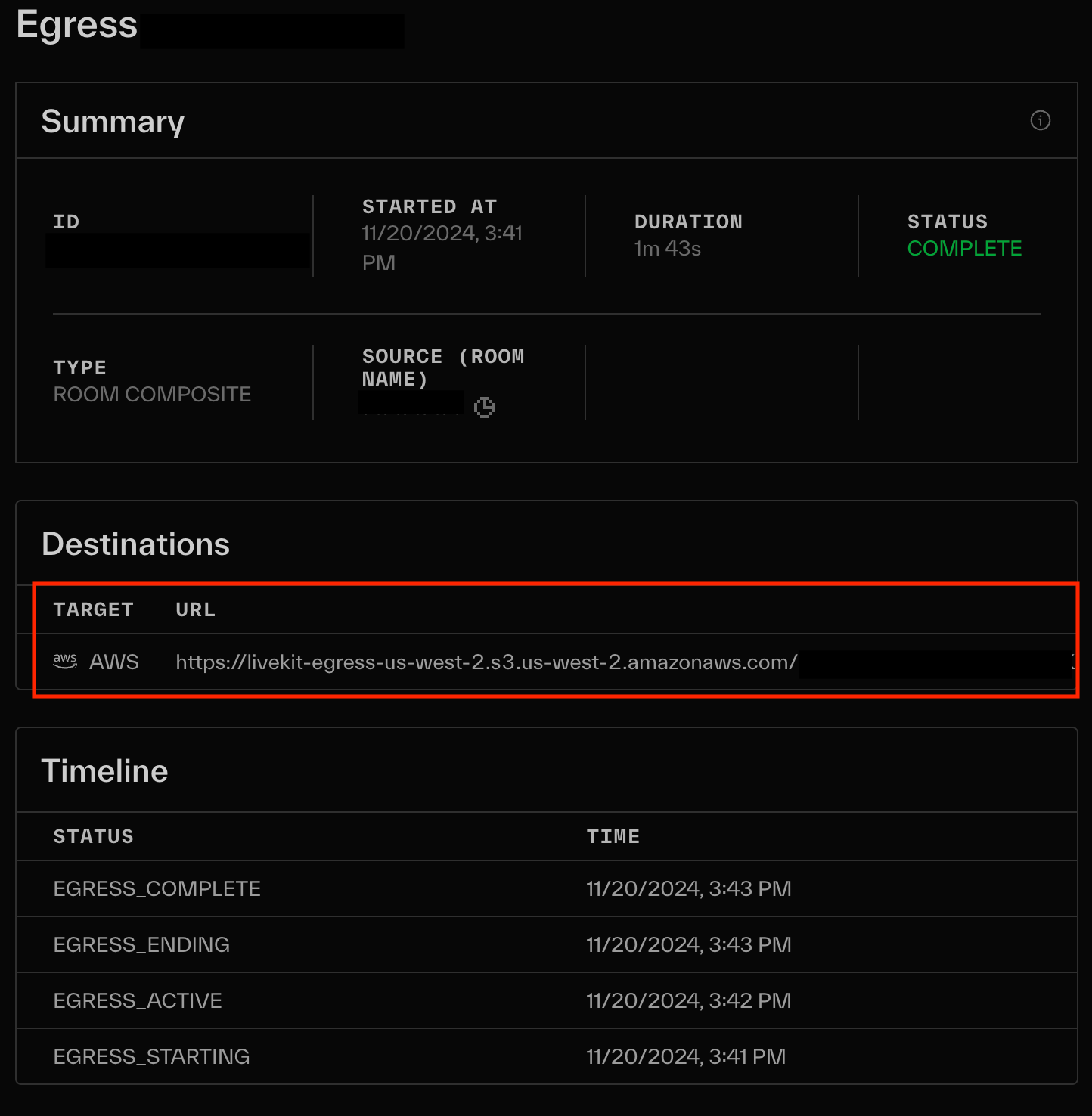
In addition to the egress_ended webhook event, the backup recording is also included in the view of the egress session in the LiveKit Cloud dashboard. You can retrieve the backup recording using the URL shown in the Destinations section.
How to Enable
This must be enabled by a LiveKit engineer at this time. They will need enable this on each project where you would like this feature.